Your AI agent will have to read Gmail, update Jira tickets, and query a database. With plain APIs, you build three separate custom integrations. They all require authentication, error handling and testing. Then one of them is broken by an API update, and you re-debug. This is the problem the MCP vs API debate is really about.
At DailyTechify, we explore practical technology topics like this to help developers make informed decisions. That suffering is the reason why developers continue to inquire about MCP vs API when it comes to AI projects. Model Context Protocol (MCP) provides your agent with a single common means of accessing all three tools. All services involved are still powered by APIs, and MCP is not a replacement for APIs but a build on them.
This MCP vs API guide explains the distinction in plain language. You get a comparison table, security risks, industry examples and a decision checklist. DailyTechify brings these ideas together in a clear, practical guide.
MCP vs API: Quick Comparison Table
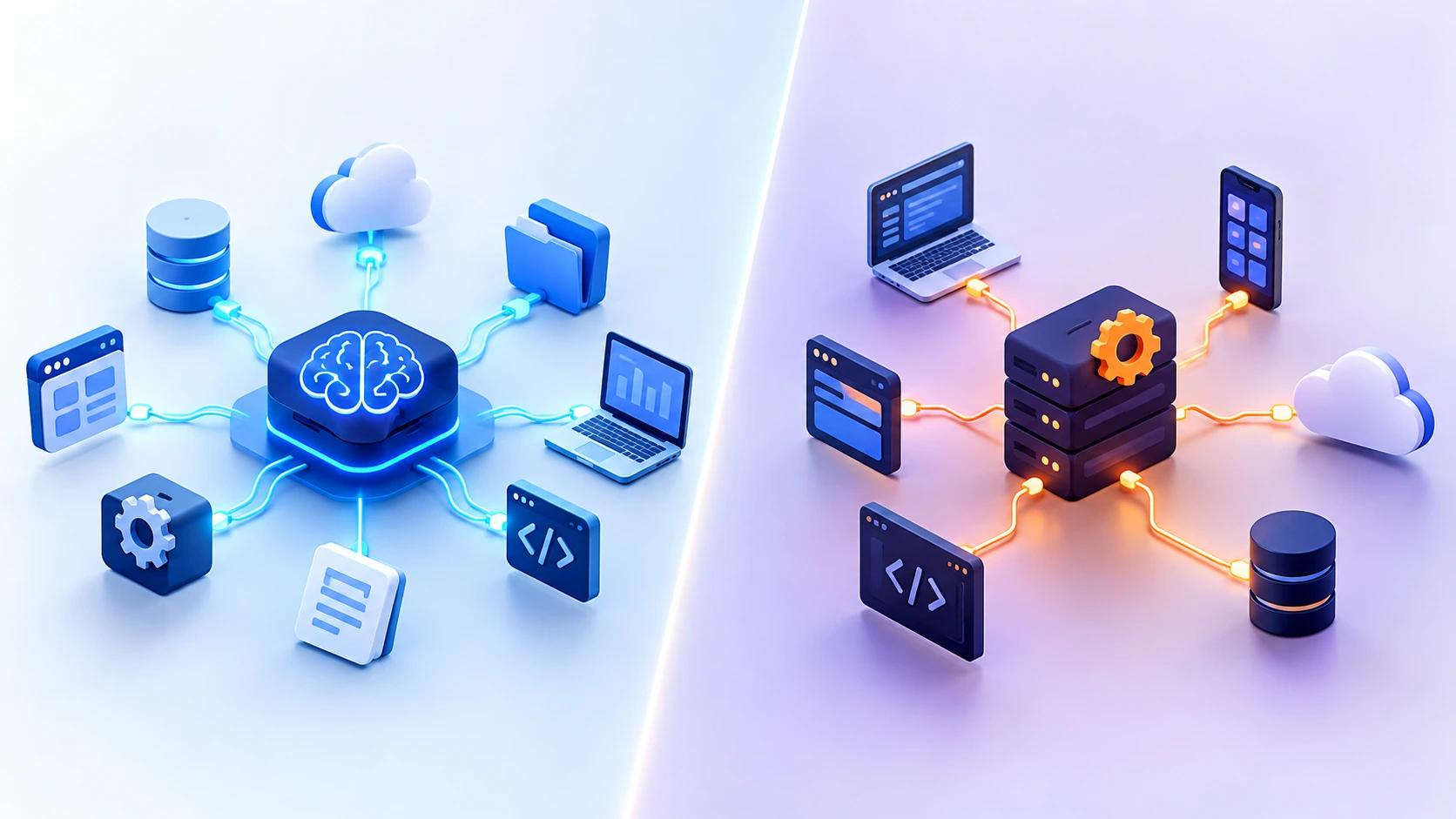
These two options are considered by most developers as competitors, although they execute on different levels of your stack. The difference between API and MCP is who makes the decision about the next step. Using API, your programmer creates code that preemptively grabs each call. In MCP, the AI model selects the tool to be used as it is running.
API vs MCP difference of 11 factors.
| Factor | API | MCP |
|---|---|---|
| Built for | Developer code | Artificial intelligence (AI) models and agents. |
| Who determines the nomenclature? | Application code | At runtime the model can be represented. |
| Discovery | Docs are read at design time by developers. | Tools/list are called by the client. |
| State | Mostly stateless | Stateful session |
| Protocol | REST, GraphQL, SOAP or gRPC. | JSON-RPC 2.0 (one standard) |
| Integration math | N×M custom connectors | N+M components |
| Credentials | Frequently within the code of the app or agent. | Being held by the server, out of the model. |
| Error format | Different for every API | Standardized |
| Maturity | Hundreds of years of practice and equipment. | New, and direction is yet to develop. |
| Typical example | A GET request to a GH issues endpoint. | A list-issues application on an MCP server that is a GitHub. |
| Best fit | Fixed, predictable workflows | Multi-tool, dynamic agent workflows. |
Summary: In the MCP vs API comparison, APIs give developers fixed connections, while MCP gives AI models a common way to find and use tools.
What Is an API?
An API or application programming interface is a set of rules that allow one program to request other programs to provide data or actions. The message is sent by the requesting program and a reply is provided by the other program. The inside stories of each are unknown to the other.
Think of a restaurant. You read the menu and order the waiter what you want. The waiter takes your order to the kitchen and delivers your food. The API is the waiter and you never enter the kitchen.
There are four reasons why APIs deserve to be used. A single payments API can support your website, mobile application, and internal applications. An open-source spec like OpenAPI represents all the endpoints, and both frontend and backend implementations are developed concurrently. Caches and load balancers assist APIs to scale. They are guarded by OAuth, API keys and rate limits.
You interact with APIs on a daily basis. Stripe and PayPal accept credit cards. Sign in with Google is based on OAuth. Twilio transmits text messages. Webhooks work in the opposite way and the service invokes your URL on an event occurrence.
API Protocols Compared
There are a number of API protocols that teams can select, and each one is suitable for various jobs. Purely speaking, REST is a design style and GraphQL a query language. They are still bundled together by developers as they choose how systems communicate.
Transport: MCP vs API protocols.
| Protocol | Style | Best for | Limitation |
|---|---|---|---|
| REST | HTTP with resources | Web and mobile apps | Fetching too much or too little data. |
| GraphQL | Single endpoint with queries | Flexible client data | Multifaceted caching and query expenses. |
| SOAP | XML contracts | Old systems in enterprise and banking. | Heavy messages and setup. |
| gRPC | Binary HTTP/2 messages. | Microservices and speed | Limited browser support |
| WebSocket | Persistent two-way connection | Real-time updates | Your code should cope with state. |
| MCP | JSON-RPC 2.0 on top of stdio or Streamable HTTP. | AI tool access | Newer ecosystem |
Every protocol has its protocol style of request, its protocol error format and its protocol client library. A group that links ten services is also likely to learn four or five services. MCP occupies another location. It is not a network layer competitor to either REST or gRPC. A REST API is frequently called by an MCP server, which is subsequently passed to the model in a standard format.
What Is MCP (Model Context Protocol)?
Model Context Protocol is an open-source technology that links AI applications to tools and data. It was introduced by Anthropic in November 2024. All tools have a single common format in place of custom code.
Adoption moved fast. The protocol is supported by ChatGPT, Cursor, Gemini, Microsoft Copilot, and Visual Studio Code. In December 2025, Anthropic donated MCP to the Agentic AI Foundation, which is under the Linux Foundation.
How MCP Architecture Works
MCP employs three roles. The host is the AI app you work with, e.g., Claude Desktop or VS Code. The client is an element within the host that handles a single server connection. The server is software that reveals tools and information. When your host is connected to three servers, then it will execute three clients.
The following is the flow including a GitHub server:
- You request the host to enumerate your open issues.
- The model selects the appropriate tool among the list of tools in the server.
- The client forwards that request to the server.
- The server makes a call to GitHub API and provides the result.
Be aware of the final step. A normal API is still used by the server.
Three Primitives: Tools, Resources, and Prompts
Each MCP server can provide up to three capabilities. The two types have dissimilar controllers.
- Tools: Actions the model can run, such as create_issue. The model controls them.
- Resources: Read-only context, such as a README file or database schema. The app controls them.
- Prompts: Reusable templates that users pick, such as “Summarize this week’s open issues.” The user controls them.
The majority of servers begin with tools. Embellish content and call-ins where your users require more depth.
Local vs Remote Transport
MCP has two transports currently. The stdio will start a local process on your machine as a server. The Streamable HTTP option enables remote servers to communicate with the clients via the web. Remote servers tend to provide OAuth sign-in. Do not post the existing MCP specification as it has evolved since then.
What Is an MCP Connector?
An MCP connector is the configuration that connects an AI application to an MCP server. It informs the app of the location of the server and the way of signing in. Different vendors refer to this concept differently; hence read the documentation for each product. You put a remote server URL in Claude, log in, and the tools of the server are shown in your chat.
Myth: The MCP server figures out what you mean.
Fact: The model of language reads your mind. It reads the description of each of the tools, selects a tool and completes the inputs. The call is just run by the server.
Difference Between API and MCP: 9 Key Differences
The quick view was provided in the table. This section provides the background of each difference.
1. Who Controls the Call
The API calls are pre-written by a developer. In MCP, the model selects the tool to execute as the dialogue takes place. The change in that shift modifies the extent of freedom granted to the AI by your system.
2. Discovery
To learn an API, developers read its documentation and hard-code each endpoint. A client of MCP requests the server to tell what it provides, via the tools/list method. The list is updated on every connection of the client.
3. State
A majority of web APIs handle requests individually. Any history is traced in your code. Context can be passed between calls: MCP begins a session upon connecting the client.
4. Standardization
Each API has its way of doing things. One of the services is based on REST and page numbers, another one on GraphQL and a third one on gRPC. MCP presents the AI apps with a single message format, which is based on JSON-RPC 2.0.
5. Integration Effort
Suppose that your team is operating three AI applications and six tools. Single API custom work connectors require 18 connectors, one connector per pair. MCP requires nine components, three clients and six servers. This figure is indicative, not a survey outcome.
Each tool still requires a server of MCP. That saving is achieved by constructing a single server.
6. Credentials and Security
Plain API integrations tend to store keys within the application or agent code. A typical MCP server maintains those keys; therefore those keys are never visible to the model.
This configuration does not render MCP safe per se. Even a weak server would have leaked data. A model can also be fooled by the hidden instructions contained within a tool description. Limit each server to the minimum permissions.
7. Error Handling
Errors are reported differently by each API. One returns a 429 message with a message and the other returns a 200 with an error field. MCP has a shared structure; thus, the model is able to read a failure and retry or describe it.
8. Token Cost and Context Size
A simple API call is free to the model since your code takes care of it. When you connect a model via MCP, costs are shown. All the name, description and input schema of tools occupy space in the context window.
Tool results occupy space as well. A server that responds with a complete raw reply can stuff that window with fields that the model does not require. Only give back what the task demands.
9. Scalability and Maturity
APIs possess scaling tools that have a history of decades. Caches, CDNs, and load balancers are responsible for massive traffic daily. MCP is more modern and long-lived sessions may pose more difficulties in scaling. Streamable HTTP assists in that it supports stateless configurations. Even best practices are evolving on a monthly basis.
MCP Security and Governance Risks
MCP puts a real agent in control of your tools and data. The first step to good MCP security is the understanding things that can break.
- Tool poisoning: A tool description conceals malicious instructions that the agent obeys.
- Too generous permissions: A single bad prompt accesses a lot more data than the task requires.
- Immediate injection: Evil code within an email or web page guides the agent.
- Shadow MCP servers: Employees set up untested servers, which access company data.
There is no one control that will work, so stack up several. Minimize privileges, utilize scoped tokens. Verify servers and record all tool calls. Make people approve destructive measures. These rules are bound by strong AI governance within the teams. That structure can be established by our AI governance guide.
MCP Server Workflow Automation
A single task can be implemented by an AI agent using multiple tools. You mention the objective, and the agent selects each step. MCP servers provide a conventional means of accessing all the tools on the path.
Example: Spike Check, Ticket, and Slack Alert
What you are trying to do is easy. Monitor the error rate, raise a ticket when it peaks and inform the team. You are using three MCP servers: monitoring, issue tracker, and Slack.
- Provide the agent with the objective: Investigate the rate of errors in checkout over the past hour. If it goes out of control, open a ticket and notify Slack.
- The client makes calls to tools/list on each of the three servers and the model observes what each can do.
- The error rate is read by the agent using a read-only tool on the monitoring server.
- The agent matches it with your threshold. Write: above 2 per cent. The number above is a guideline; therefore limit yourself.
- The agent queries the issue tracker to find an open ticket with the same problem. This is to avoid repetitive tickets.
- The agent creates a ticket with a title, the error rate and a time range.
- The agent sends a brief message with the ticket link to your on-call channel.
Steps 3 and 5 only read data. Steps 6 and 7 change things in the real world. Until you are confident in the agent, have write actions subject to human approval.
Fixed Pipeline vs Agentic Workflow
Not all tasks require an agent. The steps are followed in order within a fixed pipeline. That job is usually better done by a cron job or CI script.
| Factor | Fixed pipeline | Agentic workflow |
|---|---|---|
| Who picks the steps | Your code | The model, on the run. |
| Best for | Routine actions with familiar procedures. | Activities that involve changing paths. |
| Cost per run | Low and predictable | Higher, due to the use of tokens in the model. |
| Output | Same every time | May not be repeatable. |
| Example | Daily report at 9 a.m. | Research a warning, and determine the course of action. |
Plain APIs and a scheduler in case your steps are never changed. Apply an agent where the subsequent action is dependent on what it finds. It is in that sort of variety that the cost of MCP server workflow automation goes.
Observability: Track What the Agent Does
An agent decides its course when it is running, thus you cannot predict all calls. Document the goal, every tool invocation with its inputs, every output, usage of tokens and every approval. Assign a run trace ID to each run to be able to retrace the entire path. Be suspicious of calls to unfamiliar tools.
Which Industries Use MCP?
Groups in most sectors enquire as to which industries use MCP and its applicability within their tasks. Software teams were the initial movers due to the fact that developers are already inside the tools that facilitate MCP. The same pattern is followed in other industries. They relate an agent to the systems that their staff use on a daily basis.
Note: The table below shows typical patterns. It is not a detailed arrangement of any particular company. When we are able to check the claim, then we name the companies.
Typical MCP Use by Industry
| Industry Typical | l MCP use Role | e of APIs | What to watch |
|---|---|---|---|
| Software/DevOps | Code repos, CI/CD, incidents. | Git, CI, and monitoring APIs | Permissions |
| Customer support | Tickets, knowledge base, and CRM through one agent | CRM APIs and Ticketing APIs. | PII handling |
| Fintech | Data and document search. | KYC APIs and core banking. | Audit and compliance |
| Healthcare | Summary of records and scheduling. | EHR APIs | HIPAA-type rules |
| E-commerce | Order assistants and catalog assistants. | Store and payment APIs. | Consent to refund activities. |
| Data/Analytics | APIs used in databases and BI. | Database and BI APIs | Read-only scopes |
APIs are not substituted with MCP in any area. The actual actions are still implemented by API, and MCP provides the agent with a clean interface to them. Begin with a single low-risk use case, restrict permissions, and then expand when your team feels comfortable with the setup.
How MCP and API Work Together (Hybrid Architecture)
There is no real product competition between MCP and APIs. They work as two layers in one system. Your business logic and data are stored in the API. MCP provides the agent a pure approach to it.
Diagram: User → AI App (host) → MCP client → MCP server → REST API → Database.
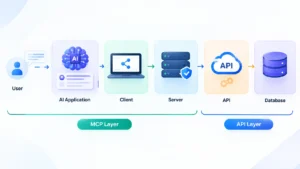
A user inputs a query in the AI application. The client communicates with your MCP server and is a host running a client. The server will be in front of your current REST API and informs the agent about the tools available. Upon the agent selecting a tool the server invokes the API. The API is used to read or write the database and the result is trimmed by the server and sent back. You reconstruct less than the MCP server.
Example: CRM Plus an AI Agent
Imagine a sales representative who requests the agent to give him open deals that will close this month. The agent calls a “list deals” tool on your MCP server. The API of your CRM software is queried by the server and provides you with a short list. The rep requests a follow-up draft, which he reviews and forwards. The CRM keeps full control of the data.
How to Convert an API to an MCP Server
Many teams ask how to convert an API to an MCP server. You do not need to start over. Follow these five steps.
- Pick one use case. Begin with one job, e.g., find the last three orders of a customer.
- Only tools needed should be exposed. Select the minimal API actions, which can serve that job.
- Keep outputs short. Only send back the fields required by the agent.
- Auth on the server. The model or the prompt will never pass secrets.
- Record all calls. Execute real prompts and observe agent actions.
The Thin-Wrapper Trap
Most beginner builders enclose each API endpoint within its tool. That is a quick one, and then the agent has dozens of tools and selects the incorrect one. An API is used by developers who read documentation. An agent must have task-based tools.
As an example, create a get customer summary tool. Allow it to call the profile, orders and tickets endpoints behind the scenes. The agent does not choose three decisions, but one. Label each tool using simple words and describe it.
MCP vs Function Calling
MCP vs Function Calling is also confusing for developers. A model feature is the ability to call functions. It allows the model to give a structured request to execute a function that you define. MCP is a standard for exposing and finding tools. The two collaborate. The model selects a tool using function calling and MCP provides the list of tools and makes the connection.
| Factor | Function calling | MCP |
|---|---|---|
| What it is | A model capability | A standard protocol |
| Main job | Invokes a call to a function in the model. | Finds and locates tools in apps. |
| Reuse | You specify each-app tools. | A single server has a large number of clients. |
MCP vs API: Which One Should You Use?
The right MCP vs API choice depends on who makes decisions in your system. If a developer chooses each step, use an API. When an AI agent makes decisions on the fly, use MCP. There are numerous commodities that require the two.
Decision Checklist
| Your situation | Best choice | Why |
|---|---|---|
| Fixed endpoints are called by a developer. | API | The steps never change, so tool discovery adds nothing. |
| The system is latency sensitive, such as trading or fraud checks. | API | Direct calls do not go through the additional layer and are quicker. |
| The pipeline is non-random. | API | You do not want the judgment of an agent but its predictable results. |
| A runtime selection of tools is required by an agent. | MCP | The agent is able to find and select tools automatically. |
| The job has numerous processes and procedures. | MCP | The agent is linked to all the tools via one protocol. |
| You require foreseeable reasoning and versatile agent access. | Hybrid | The work is run by APIs and MCP allows the agent to access it. |
The majority of actual products are in the middle. Your central computer is API-driven. The AI features you have are executed on MCP since the agents must have the liberty to select tools. If you are uncertain, set it up with your current APIs, an additional small MCP server, and test it with a single use case.
Fast rule: Who is the next step picker? In case your code picks it, employ an API. In case the agent picks it, employ MCP. Assuming the two must choose, make a hybrid.
Common Mistakes to Avoid
Most teams get the MCP vs API decision wrong for simple reasons. They rush the design, skip safety measures, or use the protocol where it does not belong.
- Wrapping every API endpoint 1:1. Combine related calls into a single tool and single job.
- Co-Locating 40+ tools on a single server. There are far too many tools that bewilder the agent. Break up large toolsets into smaller servers.
- Ignoring permissions. Grant access only to the extent to which a task. Start read-only.
- Skipping logging. Note all tool calls, their inputs, and output.
- Using MCP everywhere. A fixed pipeline is more suitable as a simple API call. Include MCP only in cases when an agent has to select tools.
There are four questions to ask before you launch. Does every tool have one distinct job? Do all the servers remain small? Is every agent in possession of only the access required? Are you able to follow all the calls in your logs? If you say no to any one of them, correct that first.
Frequently Asked Questions
1. What is the difference between API and MCP?
An API is a fixed interface that developers call with set requests. MCP lets an AI agent discover and pick tools on its own at runtime.
2. Does MCP replace APIs?
No. An MCP server sits on top of your existing APIs and calls them. Your APIs still do the real work.
3. Is MCP more secure than an API?
Not by default. MCP adds risks like tool poisoning and prompt injection. Limit permissions, use scoped tokens, keep logs, and require approval for risky actions.
4. Which industries are using MCP?
The industries where software engineers take the lead are customer support, finance, healthcare, e-commerce, and analytics. Before you develop any code, make sure that your personal data policies and regulations allow this.
5. What is an MCP connector?
An MCP connector provides an AI application with access to another system or database via MCP. The term “MCP connector” is commonly used when speaking about an MCP server (such as a CRM).
6. Can I change my current REST API to an MCP server?
Yes. Pick one use case, expose only the tools you need, and keep outputs short. Handle auth on the server, then test and log every call.
7. How is MCP different from function calling?
Function calling lets a model request a function you define. MCP is a standard for exposing and discovering tools across apps. The two work together.
8. When should I still use a traditional API?
Use an API when your code knows every call in advance. Fixed pipelines, fraud checks, and batch jobs run faster and more predictably without an agent.
Final Verdict
Your software is based on APIs. They execute the code, traffic the data and ensure your systems are quick and predictable. Without them nothing in your stack works.
MCP places the AI on top. It allows agents to locate tools and interface with them across systems without writing special-purpose code in each. The MCP vs API question has a simple answer: you rarely have to choose one.
A hybrid is best in most teams. Retain your APIs for core work, and use a small, secure MCP server where agents can have flexible access. Begin with a single use case, test, and expand.